OpenClaw Troubleshooting Checklist: 4 Pitfalls to Avoid in Feishu Agent Config
Encountering fatal errors or unresponsive bots while deploying your OpenClaw multi-agent group? Don't panic! Here are the 4 most critical lessons learned to help you troubleshoot your gateway and permissions.
If you successfully linked your Feishu custom app with OpenClaw following my previous group chat config tutorial, congratulations! However, during real-world deployments, numerous trivial yet fatal issues can cause your bots to play dead, fail to communicate, or crash the service.
To save you a sleepless night, I’ve compiled the 4 must-know pitfalls I encountered while configuring the setup.
Pitfall 1: Forgetting to "Restart the Gateway"
The Symptom: Everything looks perfect, parameters have been triple-checked, yet the bot completely ignores you in the group chat.
The Cause & Solution:
No matter how small your configuration change is (whether you edited openclaw.json, added an API read permission in Feishu, or just uploaded a new app icon), you must reload the gateway service for it to latch onto the new hooks!
Run this golden restart command in your terminal:
openclaw gateway restart
Always follow up with a status check to ensure your channels show green lights:
openclaw gateway status
Only when it explicitly returns Feishu: ON | OK and correctly counts your accounts 1/1 can you consider the reload successful.
Pitfall 2: TUI Fatal Error due to Duplicate Feishu Plugins
The Symptom: Upon starting OpenClaw via the TUI or checking status, red text screams a "Fatal Error: Duplicate Feishu plugin found".
The Cause & Solution: OpenClaw installs its core extension packages in the user directory by default. It's highly likely you have two copies of the same logic:
~/.openclaw/extensions/feishu(This is the core working package that must be kept).- The demo modules sitting in the
extendsfolder of the downloaded source code.
The Fix: Keep the first one located in your user directory. Boldly delete (or zip backup) the duplicate source package found within your project installation directory.
Pitfall 3: Assuming the "Onboard" Command is Mandatory
Many beginners are misled into believing they must run openclaw onboard to register configurations whenever they touch any service.
In reality, onboard is just an interactive CLI wizard designed to be beginner-friendly. Because configuring enterprise address books and multi-dimensional webhooks involves mapping complex identifiers, manually editing the openclaw.json directly via VS Code is far more straightforward and flexible. Once edited, the system parses it immediately. You do NOT need to run the Onboard flow again.
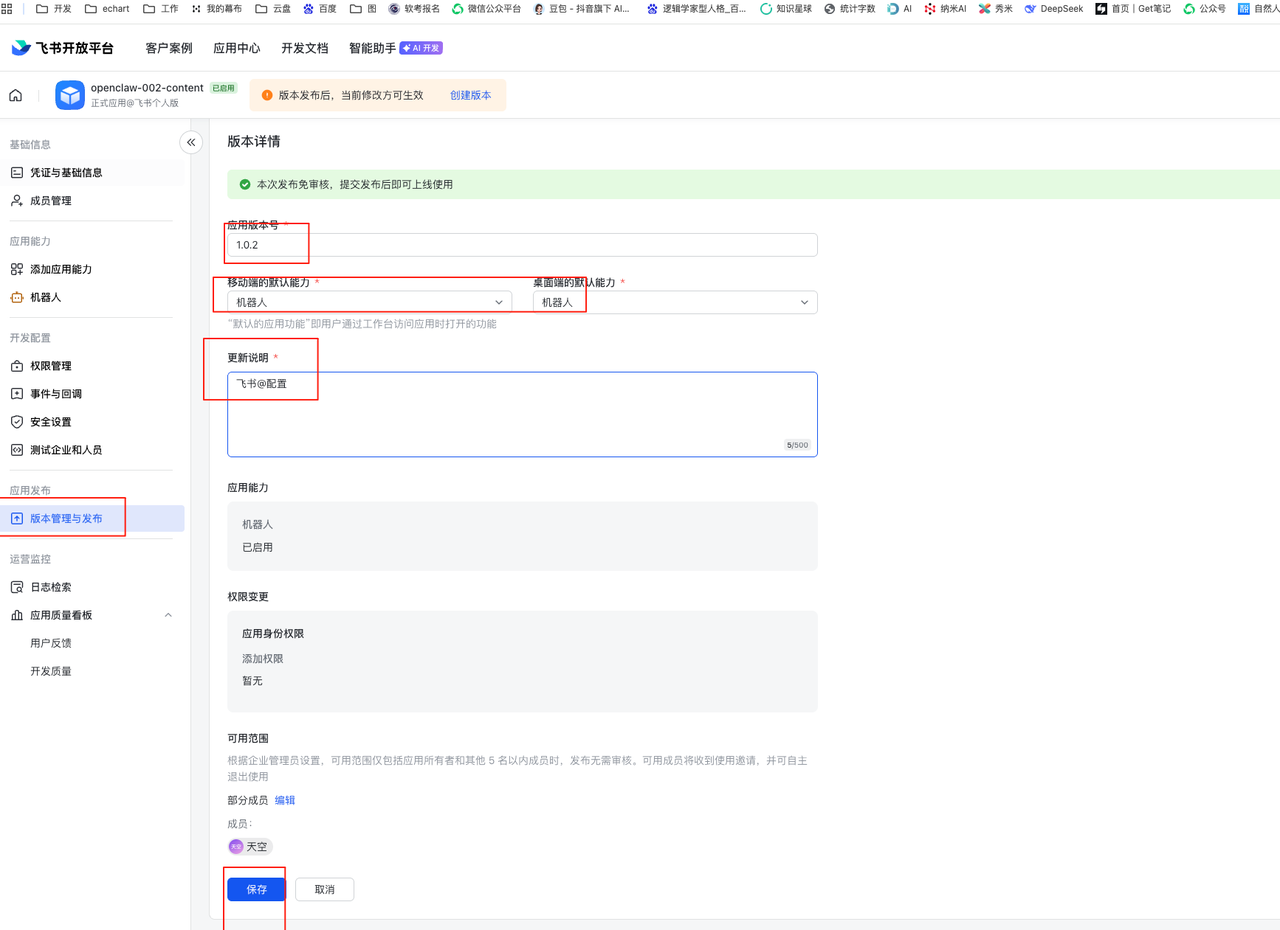
Pitfall 4: Neglecting to Click "Release" on the Feishu Dashboard
The Symptom: You updated message-read scopes and configured webpage events in the Feishu developer console. You even restarted your local gateway. But you still aren't receiving callbacks!
The Cause & Solution: Feishu enforces strict security protocols for custom enterprise apps. Any addition or deletion of permissions does not immediately apply to the live production version.
You must consistently navigate to the left-hand menu, select Version Management & Release, click Create Version, and submit an Request Release. Only when that version tag turns to a crisp green "Published" will those new permissions actually take effect in your chatbot ecosystem.
If you cross-check these four pillars, your digital OpenClaw employees should run effortlessly in the cloud and across your group chats. Feel free to reach out via my website if you encounter more peculiar bugs!