Step-by-Step Guide: Configuring Multi-Agent OpenClaw Collaboration in Feishu
Having trouble summoning multiple AI assistants in a group chat? This comprehensive guide will help you connect OpenClaw with Feishu for seamless multi-agent teamwork!
As your workflow expands, you probably have set up several specialized AI Agents in OpenClaw. However, relying solely on the Web Interface and the "Manager Agent" to delegate tasks can feel somewhat restrictive when team members want to discuss ideas collaboratively.
Is there a way to put all these AI Agents into a "group chat" where team members can directly @ them?
Absolutely: Integrate them into Feishu (Lark)!
Today, I’ll walk you through the entire process of configuring the OpenClaw multi-agent setup in Feishu, highlighting the core pitfalls you need to avoid.
Method 1: The Basic OpenClaw Web Interface (Best for Solopreneurs)
If you are an indie developer or small team lead, the Web Interface is often sufficient.
My Typical Virtual Employee Setup
- Manager: Responsible for task delegation and coordination (must be active as the central hub).
- Dev Assistant: Focuses on coding and architecture debugging.
- Content Assistant: Writes articles and polishes copy.
- Ops Assistant: Analyzes user growth and provides marketing strategies.
How it works: You cannot @content directly. Instead, you tell the manager, "Help me write a Python script," and the manager will automatically route this to the Dev Assistant.
Summary: Great for single-player mode, but lacks transparent team collaboration. Let's move to the advanced setup.
Method 2: Feishu Group Chat Deployment (Essential for Teams ✅)
This method allows your entire team to @ specific roles in Feishu, making progress visible to everyone.
Process in a Nutshell:
Create Feishu App → Set Permissions → Enable Bot → Configure Event Subscription → Publish Release → Modify openclaw.json → Restart Gateway → Add Bot to Group.
Detailed Actionable Steps
1. Create a Custom Feishu App
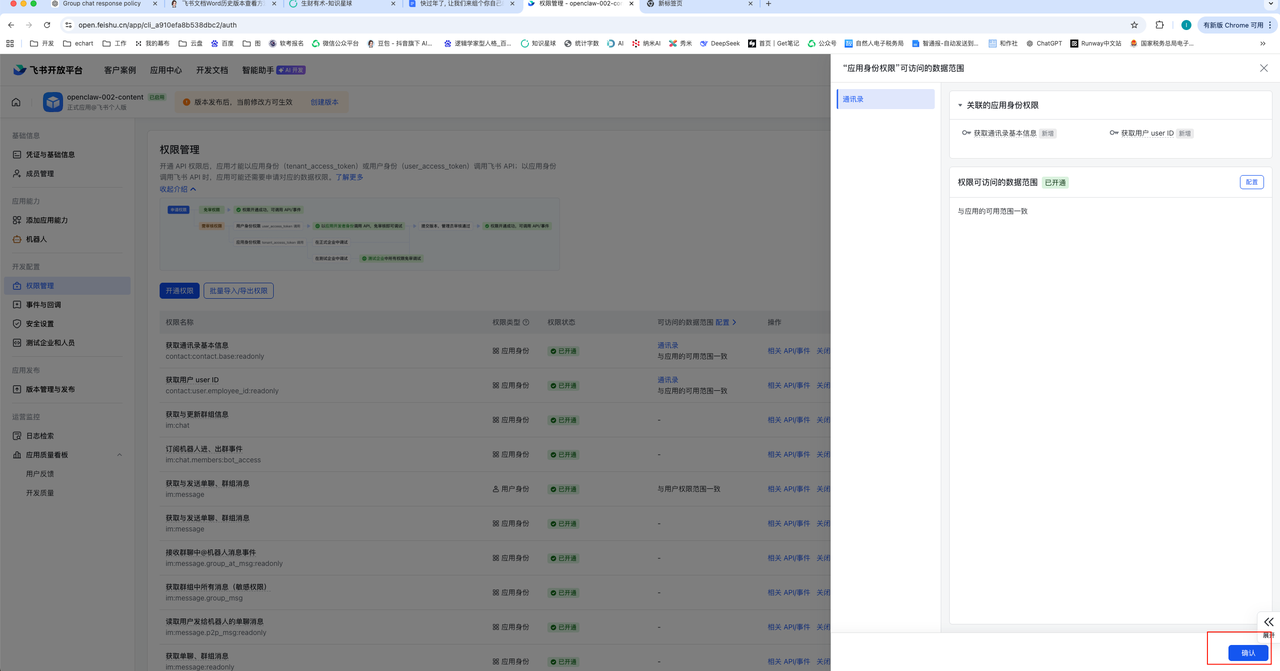
Log into the Feishu Open Platform and select Create Custom App. Give it a descriptive name and upload an avatar. From "Credentials & Basic Info", copy your App ID and App Secret.
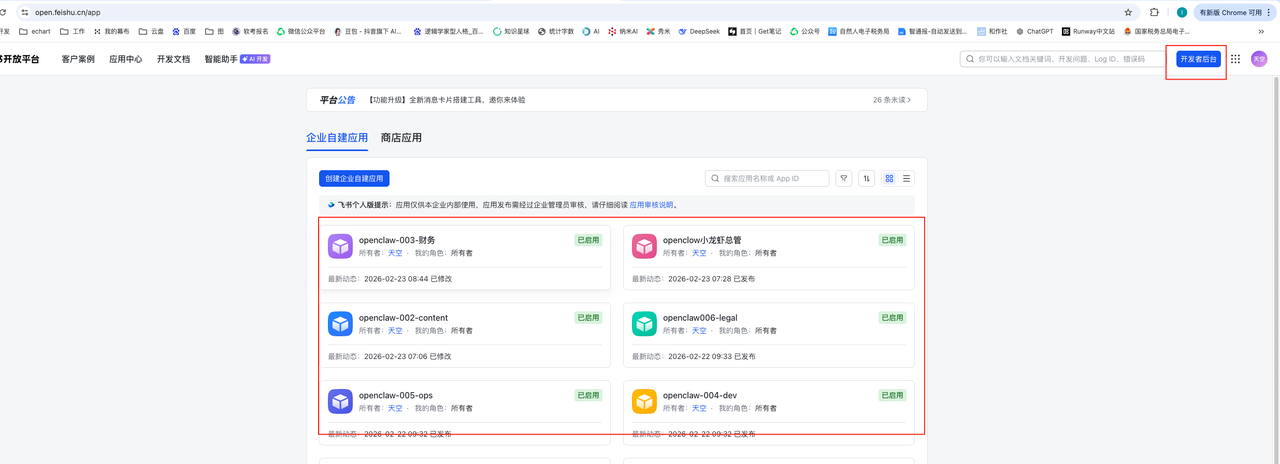
2. Configure App Permissions (Crucial Step!)
Navigate to "Permissions" -> "Bulk Import" and paste this JSON configuration:
{
  "scopes": {
    "tenant": [
      "im:chat",
      "im:chat.members:bot_access",
      "im:message",
      "im:message.group_at_msg:readonly",
      "im:message.group_msg",
      "im:message.p2p_msg:readonly",
      "im:message:readonly",
      "im:message:send_as_bot",
      "im:resource",
      "contact:user.employee_id:readonly",
      "contact:contact.base:readonly"
    ],
    "user": []
  }
}
Core Permissions Needed:
im:message:send_as_bot,im:message.group_msg, andcontact:contact.base:readonly.
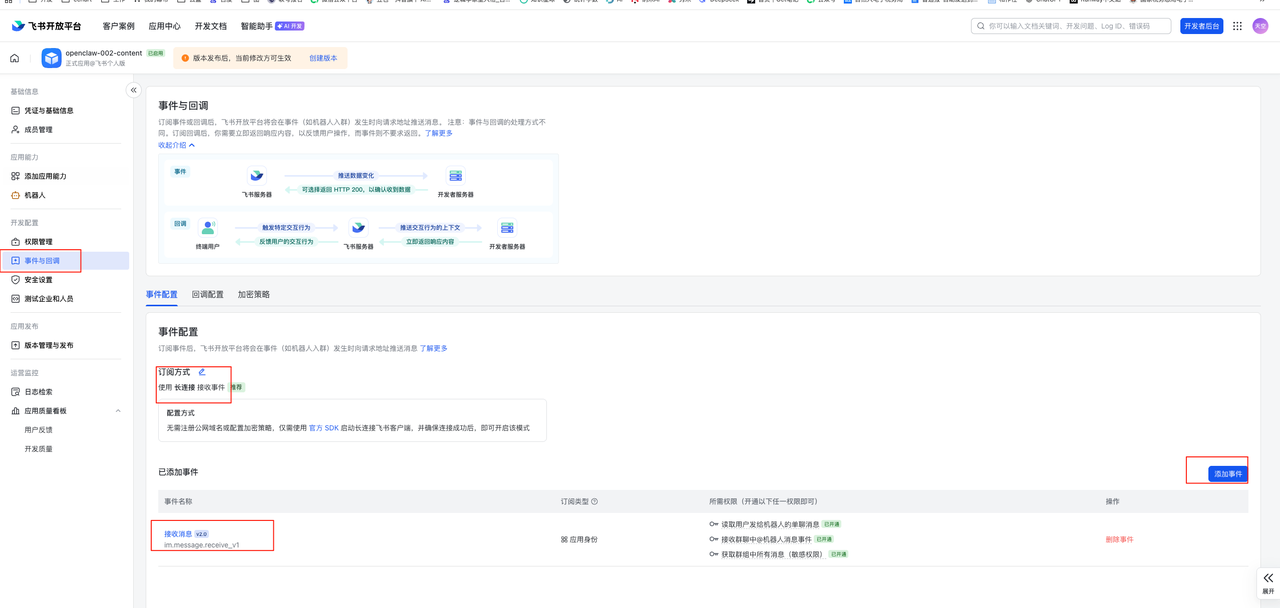
3. Enable Bot Features & Event Subscriptions
Under "App Features" -> "Bot", enable the bot. Then, in "Event Subscriptions", select "Use long connection to receive events" and add im.message.receive_v1.
4. Publish the Release
Do not skip this! Go to "Version Management & Release", create a new version, and apply for release.
5. Local OpenClaw Config & Restart
Open openclaw.json on your server. Add the Feishu credentials under the feishu channel. You must restart the gateway:
openclaw gateway restart
Check with openclaw gateway status to ensure Feishu: ON | OK is displayed.
6. Add AI to the Feishu Group
Open the Feishu App, create a department group, go to Group Settings -> Group Bots, and add your newly created bot.
Type @YourBotName Hello! in the chat. If it displays "Typing..." and responds, your multi-agent synergy is successfully running!
Feel free to drop a comment or check out my other tutorials on my website if you encounter any bugs while setting up your AI Virtual Team!